
How to Track Local SEO Results in Skokie, IL (No Vanity Metrics)
zolqix
Zolqix Team

Track local SEO results in Skokie by measuring calls, direction requests, form leads, and booked jobs instead of relying on vanity metrics. A Skokie business owner we’ll call typical gets a monthly SEO report showing “domain authority up 4 points” and “organic traffic increased 22%.” Both numbers look good. Neither one answers the only question that actually matters: did the business get more calls, more direction requests, and more booked jobs this month than last month?
This is the gap between vanity metrics and real local SEO KPIs. Vanity metrics are numbers that move in a direction that feels good but don’t reliably connect to revenue. Real KPIs are the specific, trackable signals that tie directly to phone calls, website leads, and paying customers. For a Skokie business — competing in a market that spans the Old Orchard retail corridor, Niles Center Road, the Oakton Street commercial strip, and a dense, diverse residential base — the difference between tracking the right numbers and the wrong ones determines whether you know if your SEO investment is working at all.
This guide breaks down exactly which metrics matter, which ones don’t, how to set up tracking that captures the metrics that matter, and what a properly built monthly report should actually look like for a Skokie business.
The core distinction:
Vanity metrics describe activity. Real KPIs describe outcomes.
“We published 4 blog posts” is activity. “Organic search drove 11 phone calls this month” is an outcome.
“Domain authority increased” is activity. “Direction requests from Google Maps are up 30% month over month” is an outcome.
A good report leads with outcomes and uses activity metrics only to explain why the outcomes moved.
What Counts as a Vanity Metric (And Why It’s Misleading)
Vanity metrics aren’t fake or meaningless on their own — they’re just disconnected from the thing you’re actually trying to achieve: more customers. A metric becomes a vanity metric specifically when it’s used as a stand-in for business results without a demonstrated connection to those results.
The Most Common Vanity Metrics in Local SEO Reporting
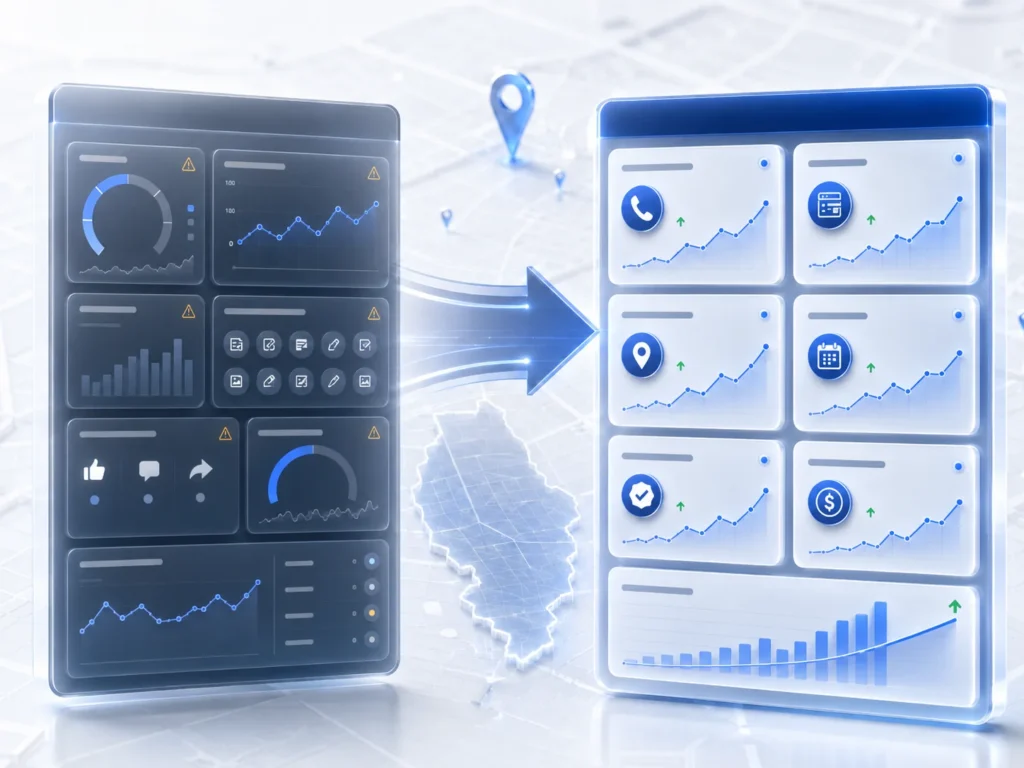
- Domain Authority (DA) or Domain Rating (DR): third-party scores from Moz or Ahrefs that estimate a website’s overall link authority. These are useful internal benchmarks for SEO practitioners comparing competitor strength, but DA has no direct relationship to Google’s actual ranking algorithm — Google has stated repeatedly that DA and DR are not metrics Google itself uses or recognizes. A DA increase from 18 to 24 tells you nothing about whether your phone rang more this month.
- Total organic traffic without context: “Organic traffic increased 35%” sounds impressive until you ask: traffic to which pages, from which keywords, and did any of it convert? A spike in traffic to an unrelated blog post that ranks for an irrelevant keyword inflates this number without producing a single lead.
- Number of keywords ranking: “You now rank for 340 keywords” is frequently padded with long-tail, low-volume, and irrelevant terms that nobody searches in meaningful numbers. Ranking for a keyword with 10 monthly searches in Skokie doesn’t move your business forward.
- Citations submitted: a report that highlights “50 citations built this month” describes a task completed, not a result achieved. Citation accuracy supports rankings, but the count of citations submitted is an input, not an outcome.
- Social media followers or engagement: social signals are not a confirmed Google local ranking factor. A growing Instagram following may build brand awareness, but reporting it inside a local SEO report blurs the line between two different marketing channels.
- Generic “visibility score” indexes: some SEO platforms generate a proprietary composite “visibility” number. These can be directionally useful but are calculated differently by every tool, aren’t comparable across platforms, and obscure what’s actually driving the number up or down.
Why vanity metrics persist in reporting: They’re easy to generate automatically from SEO software, they almost always show positive movement (which feels good to report), and they don’t require the agency or in-house team to set up call tracking, GBP Insights review, or revenue attribution — the work that produces metrics that actually matter.
The Real KPIs That Matter for a Skokie Local Business
Real local SEO KPIs share one property: each one sits directly on the path between a Skokie resident searching for your service and that search turning into revenue. Here are the metrics that matter, organized by where they sit in that path.
Tier 1: Direct Conversion Signals (The Metrics That Matter Most)

| KPI | What It Measures | Where to Find It | Why It Matters Most |
| GBP phone calls | Calls placed directly from your Google Business Profile listing | GBP Insights dashboard, or a call tracking number set as your GBP phone number | Direct, attributable conversion from local search — the closest metric to revenue |
| GBP direction requests | Users tapping ‘Directions’ from your GBP listing in Search or Maps | GBP Insights dashboard | High-intent signal for brick-and-mortar businesses planning to visit |
| GBP website clicks | Users clicking through from your GBP to your website | GBP Insights dashboard (combine with UTM-tagged link for GA4 attribution) | Connects GBP visibility to your website’s own conversion tracking |
| Booked jobs / appointments from organic | Confirmed bookings attributable to organic or GBP traffic | CRM or booking software, cross-referenced with call tracking source | The actual outcome — revenue-generating activity, not just interest |
| Form submissions from organic traffic | Contact form completions where the traffic source is organic search | GA4 with channel grouping and conversion event tracking | Captures leads that don’t come through a phone call |
Tier 2: Leading Indicators (Predict Tier 1 Movement Before It Happens)
Leading indicators move first. When these are trending up, Tier 1 metrics typically follow within 4 to 8 weeks. They’re valuable specifically because they let you know your strategy is working before the phone has started ringing more.
| KPI | What It Measures | Where to Find It | Typical Lag to Tier 1 Impact |
| GBP profile views (discovery) | Views from category/service searches, not direct name searches — a proxy for new-customer discovery | GBP Insights — filter for ‘Discovery’ searches specifically | 3–6 weeks |
| Search Console impressions | How often your pages appear in Google search results for target keywords | Google Search Console — Performance report | 4–8 weeks |
| Local pack ranking position | Where your GBP ranks in the 3-pack for target keywords, tracked from Skokie-specific locations | BrightLocal, Local Falcon, or similar local rank tracker | 2–6 weeks after the underlying optimization work |
| Review count and recency | New reviews received per month and days since last review | GBP dashboard directly | Recency is itself a near-immediate ranking signal |
Tier 3: Diagnostic Metrics (Useful Context, Not Headline Numbers)

These metrics explain why Tier 1 and Tier 2 numbers moved the way they did. They belong in a report as supporting context, never as the lead story.
- Click-through rate (CTR) on local pack listing: low CTR relative to ranking position can indicate a weak photo set or thin review snippet — useful for diagnosing why visibility isn’t converting to clicks
- Bounce rate on landing pages from organic traffic: high bounce rate on a service page receiving organic clicks may indicate a page speed or content relevance problem worth investigating
- Page load speed (Core Web Vitals): a technical health indicator that affects both rankings and conversion rate, but isn’t itself a business outcome
- New vs. returning organic visitors: useful for understanding whether organic search is reaching new prospects or re-engaging people who already know the business
How to Set Up Tracking for Each Real KPI
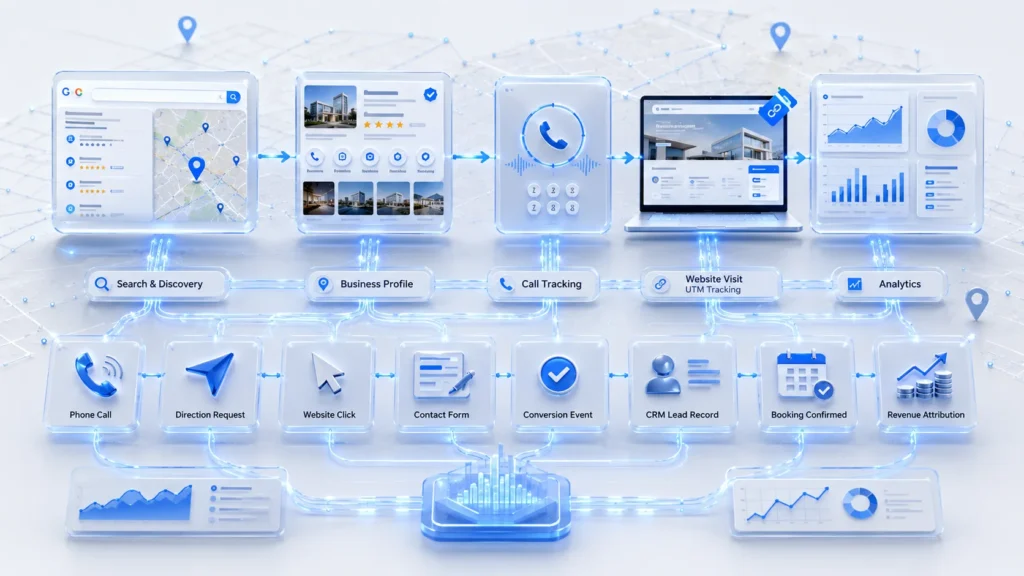
Knowing which metrics matter doesn’t help if the tracking infrastructure isn’t in place to capture them. Here’s exactly how to set up tracking for every Tier 1 and Tier 2 metric.
1. Call Tracking for Google Business Profile
The single highest-leverage tracking setup for a Skokie service business. Without it, you cannot reliably attribute phone calls to local search versus other marketing channels.
- Get a dedicated tracking phone number from a provider such as CallRail, CallTrackingMetrics, or a similar service — typically $30–$50/month for a single number with call recording and basic analytics
- Set this tracking number as your primary phone number in your Google Business Profile, replacing your direct line
- Configure the tracking number to forward calls seamlessly to your actual business line, so customers experience no difference
- Enable call recording (with appropriate disclosure per Illinois two-party consent law) to review call quality, not just call volume
- Review monthly call volume, call duration (calls under 30 seconds are often non-conversions, such as wrong numbers or spam), and time-of-day patterns
Illinois call recording compliance: Illinois is a two-party consent state under the Illinois Eavesdropping Act, meaning both parties must be notified that a call may be recorded before recording begins. Most call tracking platforms include an automated consent message at the start of the call — confirm this is enabled and that the message plays before recording starts, not after.
2. UTM Parameters on Your GBP Website Link
Without UTM tagging, traffic from your Google Business Profile blends into generic “Organic Search” or even “Direct” traffic in Google Analytics, making it impossible to isolate GBP-driven website visits from other organic traffic.
Recommended UTM format for your GBP website link:
Update this in your GBP profile under the website field. Takes under two minutes and immediately starts generating attribution data for every click.
3. Google Analytics 4 (GA4) Conversion Tracking
- Confirm GA4 is installed correctly on your website (verify via Google Tag Assistant or the GA4 DebugView)
- Set up conversion events for every meaningful action: form submission, phone number click (tel: link click), “Get Directions” click, online booking completion
- Verify the default channel grouping correctly classifies your GBP-driven traffic as Organic Search or a custom “Local” channel using the UTM parameters set up in step 2
- Build a simple custom report or exploration in GA4 isolating organic search sessions and their conversion events specifically
4. Google Business Profile Insights
- Access via the GBP dashboard at business.google.com under the “Performance” tab
- Review monthly: calls, direction requests, website clicks, and the breakdown between Discovery searches (category/service searches) and Direct searches (your business name searched directly)
- Export this data monthly rather than relying on memory — Google’s GBP Insights data retention and historical comparison windows are limited
5. Local Rank Tracking From Skokie-Specific Locations
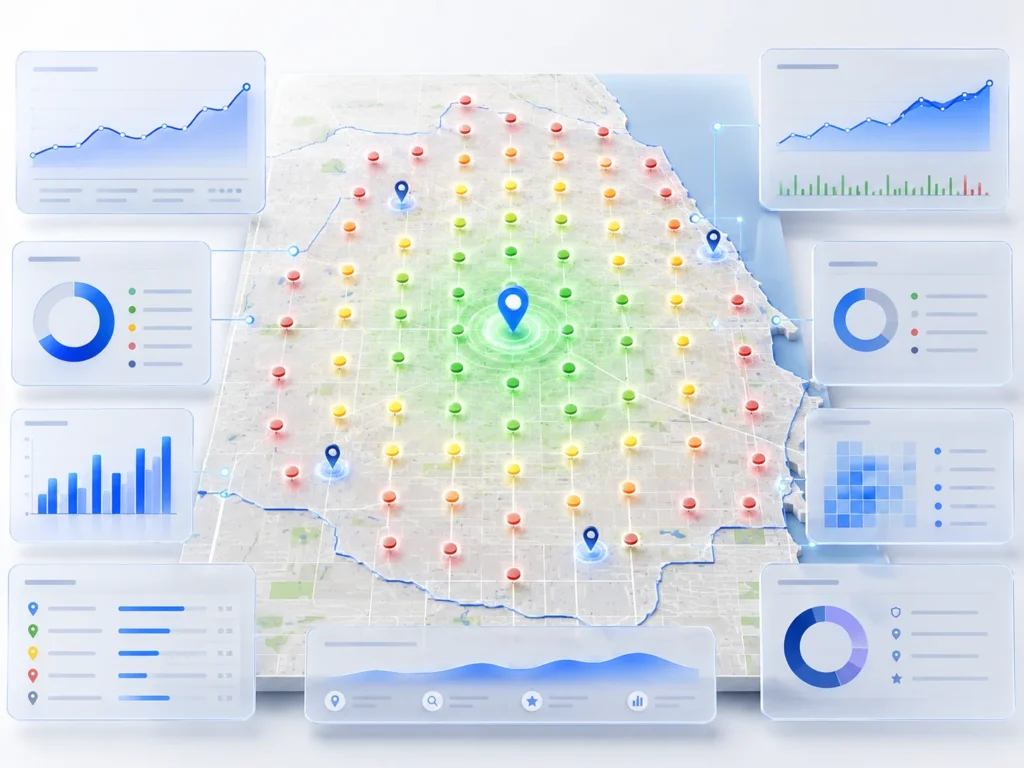
Standard Google searches are personalized based on the searcher’s account history and location, making them unreliable for consistent rank tracking. A search run from your office will show different results than a search run from a customer’s home across town.
- Use BrightLocal, Local Falcon, or a similar tool that simulates searches from specific addresses or ZIP codes
- Track positions specifically from Skokie ZIP codes — 60076 and 60077 — as well as from any adjacent communities in your actual service area, such as Lincolnwood, Morton Grove, or Evanston
- Track local pack position separately from organic web ranking position — they are different result sets and respond to different signals
What a Properly Built Monthly Report Should Include
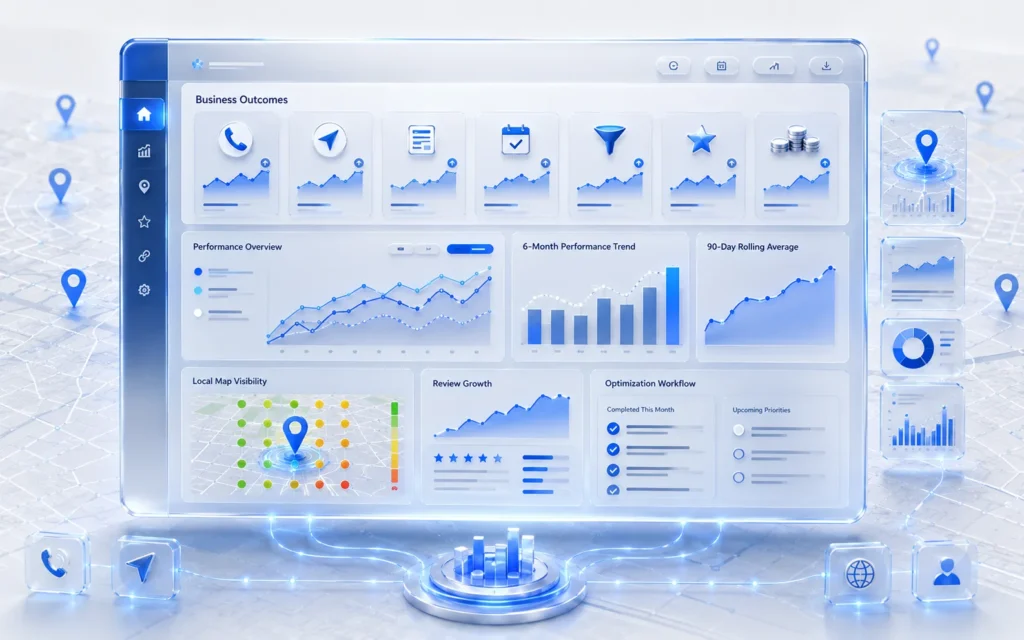
A monthly local SEO report for a Skokie business should answer one question clearly within the first page: did this investment generate more calls, direction requests, and booked business than last month, and why?
The Report Structure That Works
- Headline summary: total calls, direction requests, and leads this month, compared to last month and to a 90-day rolling average — presented as the first thing on the page, before any ranking data or activity summary
- Tier 1 KPI detail: a simple table or chart showing each direct conversion metric month over month for at least the trailing 6 months, so trend direction is visible, not just a single snapshot
- Tier 2 leading indicators: GBP discovery views, Search Console impressions, and local pack ranking position for your 5 to 10 priority keywords, framed explicitly as “early signals for next month’s Tier 1 results”
- What was done this month: a specific, dated list of completed work — GBP posts published, citations corrected, content created, links earned — framed as the explanation for the Tier 1 and Tier 2 movement, not as the headline achievement itself
- What’s planned for next month: specific, named next actions, not a vague “continued optimization”
Minimum Monthly Report Checklist:
GBP calls — trending vs. previous month and vs. 90-day average
GBP direction requests — trending vs. previous month
GBP website clicks — trending vs. previous month
Booked jobs or leads attributable to organic/GBP — pulled from CRM or call tracking
GBP discovery search views — leading indicator trend
Local pack ranking position for primary keywords — tracked from Skokie-specific locations
New reviews this month and current total review count
Specific work completed this month, dated
Specific plan for next month
A Practical Workflow for Reviewing Your Own Reports
Whether you’re reviewing a report from an agency or building your own tracking as a DIY Skokie business owner, here’s a repeatable monthly review workflow.
The 15-Minute Monthly Review
- Open GBP Insights first: check calls, direction requests, and website clicks against last month. This is your headline number before looking at anything else.
- Check call tracking data: review call volume and duration. A spike in calls under 15 seconds may indicate a phone number display issue or spam, not genuine leads — worth investigating before celebrating the number.
- Cross-reference with your CRM or booking calendar: of the calls and leads generated, how many became actual booked jobs? This closes the loop from “lead” to “revenue.”
- Review local pack position for your top 5 keywords: are you holding position, gaining, or losing ground relative to last month?
- Read the “what was done” section: does the explanation for any movement (or lack of movement) make sense given the leading indicators? If calls dropped but GBP discovery views rose, that’s worth a direct question to whoever is managing your SEO.
The single fastest way to spot a weak SEO report: ask whoever produced it to show you GBP call data and local pack ranking position from a Skokie-specific search simulation, live, on a screen share. A report built on real tracking infrastructure produces this instantly. A report built primarily on vanity metrics often can’t.
Common Mistakes Skokie Businesses Make When Tracking Local SEO

Mistake 1: No Call Tracking Number Set Up
Without a dedicated tracking number on your GBP listing, every call from local search is invisible in your reporting — you can see GBP Insights’ call click count, but you cannot independently verify it, record calls for quality review, or track call duration and outcome. This is the single most common gap we identify when reviewing existing Skokie business tracking setups.
Mistake 2: Comparing Month-to-Month Without a Longer Baseline
A single bad or good month, viewed in isolation, can mislead. Local search volume fluctuates seasonally — a Skokie HVAC company will naturally see different call volumes in July versus January regardless of SEO performance. Comparing against a 90-day rolling average alongside the month-over-month number controls for this seasonal noise.
Mistake 3: Treating Search Console Impressions as a Vanity Metric
Impressions are sometimes dismissed as “just visibility, not real results.” In isolation, that’s a fair critique. But impression trends are the earliest available leading indicator — rising impressions for your priority keywords typically precede ranking and click improvements by 4 to 8 weeks. The mistake isn’t tracking impressions; it’s treating them as a headline metric instead of an early-warning system feeding into Tier 1 outcomes.
Mistake 4: Not Separating GBP Discovery Searches From Direct Searches
GBP Insights distinguishes between “Discovery” searches (someone searching a category or service term who didn’t already know your business name) and “Direct” searches (someone searching your business name specifically). Reporting only the combined total obscures whether SEO work is actually reaching new prospective customers or simply capturing people who already intended to find you. Discovery search growth is the more meaningful signal for new customer acquisition.
Mistake 5: No Defined Conversion Event in GA4
Many Skokie business websites have GA4 installed but no conversion events configured — meaning the platform is collecting traffic data but nothing is marked as a measurable outcome. Without configured conversion events for form submissions, phone clicks, and booking completions, GA4’s own attribution and channel reports cannot show which channel, including organic search, is actually driving leads.
Frequently Asked Questions
What KPIs matter most for local SEO in Skokie?
The KPIs that matter most are the ones with a direct line to revenue: Google Business Profile phone calls, direction requests, and website clicks; booked jobs or appointments attributable to organic or GBP traffic; and form submissions from organic search sessions tracked through Google Analytics 4. These should be reviewed alongside leading indicators — GBP discovery search views, Google Search Console impressions, and local pack ranking position tracked from Skokie-specific locations — which tend to move 4 to 8 weeks before the direct conversion metrics do. Metrics like domain authority, total keyword count, or citations submitted describe SEO activity, not business outcomes, and shouldn’t anchor a report.
How do I track calls from my Google Business Profile?
Set up a dedicated call tracking number through a provider such as CallRail or CallTrackingMetrics, then set that number as your primary phone number in your Google Business Profile in place of your direct business line. The tracking number forwards calls seamlessly to your actual phone while logging call volume, duration, and time of day in the tracking platform’s dashboard. This provides independently verifiable call data beyond what Google Business Profile Insights reports on its own, and allows call recording for quality review where state law permits — Illinois requires two-party consent for call recording under the Illinois Eavesdropping Act, so confirm your tracking platform plays a consent disclosure before recording begins.
What is a vanity metric in local SEO reporting?
A vanity metric is a number that moves in a direction that looks positive but has no demonstrated, reliable connection to business outcomes like calls, leads, or revenue. Common examples in local SEO reporting include Domain Authority or Domain Rating scores (third-party estimates Google itself doesn’t use), total organic traffic reported without context about which pages or keywords drove it, raw keyword ranking counts padded with low-volume irrelevant terms, and citation submission counts that describe completed tasks rather than results. These metrics aren’t necessarily false, but presenting them as headline results misrepresents what’s actually happening to a business’s bottom line.
How do I set up call tracking for local SEO in Skokie?
Sign up with a call tracking provider — CallRail and CallTrackingMetrics are both widely used and typically cost $30 to $50 per month for a single tracking number with call recording and reporting. Provision a local number with a Skokie-area code if available, set it as your Google Business Profile’s primary phone number, and configure call forwarding to your actual business line so the customer experience is unchanged. Enable the platform’s built-in consent disclosure for call recording to comply with Illinois’s two-party consent law. Once live, review the dashboard monthly for call volume, average call duration, and time-of-day patterns, and cross-reference call volume against your CRM or booking system to determine how many calls converted into actual business.
How often should I review my local SEO reports?
Monthly review is the right cadence for most Skokie small businesses — frequent enough to catch problems or confirm progress without overreacting to short-term noise in daily or weekly numbers, which fluctuate naturally due to factors like day of week and seasonal demand. Within that monthly review, compare current-month numbers against both the prior month and a 90-day rolling average to control for seasonal variation. A quarterly deeper review is also worth scheduling, specifically to assess whether leading indicators (Search Console impressions, GBP discovery views, ranking position) from three months ago accurately predicted the Tier 1 outcomes seen this month — this tells you whether your reporting model itself is working.
Why does Google Business Profile separate ‘Discovery’ and ‘Direct’ searches, and why does it matter for tracking?
Google Business Profile Insights categorizes the searches that led to a profile view into two types: Direct searches, where the person searched specifically for your business name or address, and Discovery searches, where the person searched a category or service term — such as “plumber Skokie” — without knowing your business name in advance. This distinction matters for tracking because Direct searches largely reflect people who already know about your business through word of mouth, prior visits, or other marketing, while Discovery searches reflect genuinely new prospective customers finding you specifically through local search visibility. A local SEO report that doesn’t separate these two categories can make stagnant new-customer acquisition look like overall growth, when the increase is actually coming from existing brand awareness rather than SEO performance.
Should I trust an SEO report that only shows traffic graphs and ranking positions?
Treat it as incomplete rather than necessarily dishonest. Traffic graphs and ranking positions are legitimate leading indicators and belong in a complete report, but on their own they don’t confirm whether the business generated more calls, leads, or revenue. A complete report pairs these leading indicators with Tier 1 conversion data: Google Business Profile calls and direction requests, call tracking data, and booked jobs or leads cross-referenced against a CRM or booking system. If a report consistently shows only traffic and rankings without ever connecting to calls or bookings, ask directly for that data — a properly tracked Skokie business should be able to produce it within minutes, since the underlying tracking infrastructure, once set up, generates this data automatically every month.
The Bottom Line: Measure What Pays the Bills
Local SEO reporting exists to answer one question: is this investment generating more business than it costs? Vanity metrics make a report look active and positive without ever answering that question directly. Real KPIs answer it every single month.
- Set up call tracking on your GBP listing first: this is the highest-leverage tracking investment available and the foundation for everything else
- Add UTM parameters to your GBP website link: a two-minute task that unlocks attribution data you’d otherwise never see
- Configure GA4 conversion events: form submissions, phone clicks, and booking completions need to be explicitly defined, not assumed
- Track local pack position from Skokie-specific locations: generic searches from your own office don’t reflect what your customers actually see
- Review Tier 1 metrics first, every month: calls, direction requests, and booked jobs — then use Tier 2 and Tier 3 data to explain why they moved
A Skokie business that sets up this tracking infrastructure once will know, with certainty, whether local SEO is working — not because a report says so, but because the calls, direction requests, and booked jobs say so directly.
Get a Free Local SEO Tracking Audit for Your Skokie Business
Within 48 hours, you’ll receive a written assessment of your current tracking setup — what’s missing, what’s misconfigured, and a step-by-step plan to get call tracking, UTM attribution, and GA4 conversion events fully operational. If you’re already working with an agency, we’ll also show you exactly what questions to ask them about your existing reports.
Request Your Free Audit at zolqix.com
Talk Through Your Current Reporting With a Local SEO Specialist
A 30-minute call to review your existing reports together, identify what’s missing, and map out a tracking setup that shows you exactly what your SEO investment is producing — calls, directions, and booked jobs, not just charts.
Book Your Free 30-Minute Call at zolqix.com
Questions? Contact us at hello@zolqix.com or visit zolqix.com
Last updated: June 2026 | Published by Zolqix Digital — Skokie & Chicago North Suburbs Local SEO Agency | zolqix.com
Written by
zolqix — Zolqix
Digital marketing team running local SEO, Google Ads, and growth campaigns for Chicago-area businesses. We write from what we see in active accounts.
Free — $500 value
Ready to rank
in Chicago?
Get a written audit showing exactly what’s holding back your local rankings. No call. No pitch.
No credit card • Written report within 24 hours • No obligation